
Sale to shipped, one workflow.
Scan2Tray's desktop app sits alongside your Whatnot stream and turns every sale into a ready-to-pack parcel. The hammer drops, a label prints, you stick it on — and the shipping labels at the end of the show come out in the right order too. Mac and Windows.
Live capture — no CSVs, no PDFs
Whatnot order management traditionally means waiting until the show ends, exporting a CSV, and then manually matching each order to a physical item. That workflow was fine when you sold 20 items a show. It falls apart at 200, and becomes an actual liability at 1,000 — items get lost, multi-buy customers get split across parcels, and your processing time blows up.
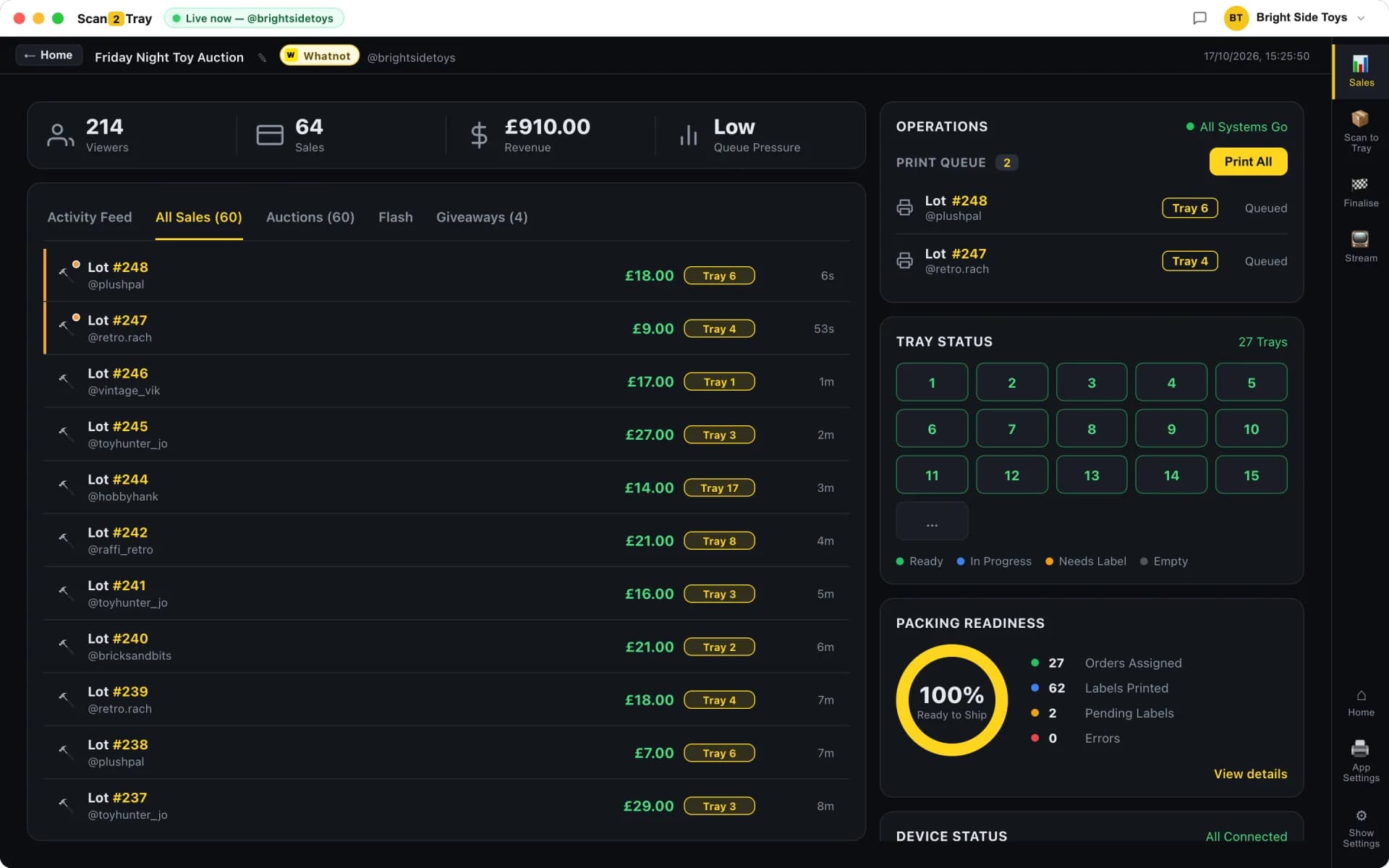
Scan2Tray replaces that entire workflow with live capture. The instant the hammer drops on an item, the desktop app records the sale and prints a tray-assigned label. You're packing while the show is still live. No end-of-show data entry, no "where did I put that CSV", no gap between selling and fulfilment. By the time you call "Sold!" on your last item, most of your parcels are already half-packed.
- Item description, buyer username and tray number on every label
- Same buyer wins three items? All three labels print with the same tray number
- Simple Mode: label prints, you stick, you drop. That's it.
- Every Whatnot order ID captured for later cross-referencing
- Works with live auctions, Buy It Now, flash sales and giveaways
- Full order history searchable by buyer, date, show or item description
What live capture looks like in practice
You open Scan2Tray on your Mac or Windows PC before your show starts. It connects to your Whatnot account once — you'll never log in again. When you go live, it quietly listens. Every time you drop the hammer, a label prints on your thermal printer within a second, and the sale appears in your desktop app's activity feed. That's the entire loop. You focus on selling; the software handles the rest.
Why it matters that it runs locally
Scan2Tray is a native desktop app, not a web app. That matters because your label printer connects directly without browser print dialogs, your sales keep getting captured even if your WiFi blips, and the software runs at native speed rather than fighting a browser render loop. If you've ever had Chrome eat your CPU mid-show, you'll appreciate the difference.
Shipping labels in the right order
The second half of Whatnot order management — the part most tools don't even try to solve — is matching your shipping labels to your packed parcels. Whatnot gives you a PDF with all your shipping labels, usually in order of sale or by order ID. Neither of those matches how you packed.
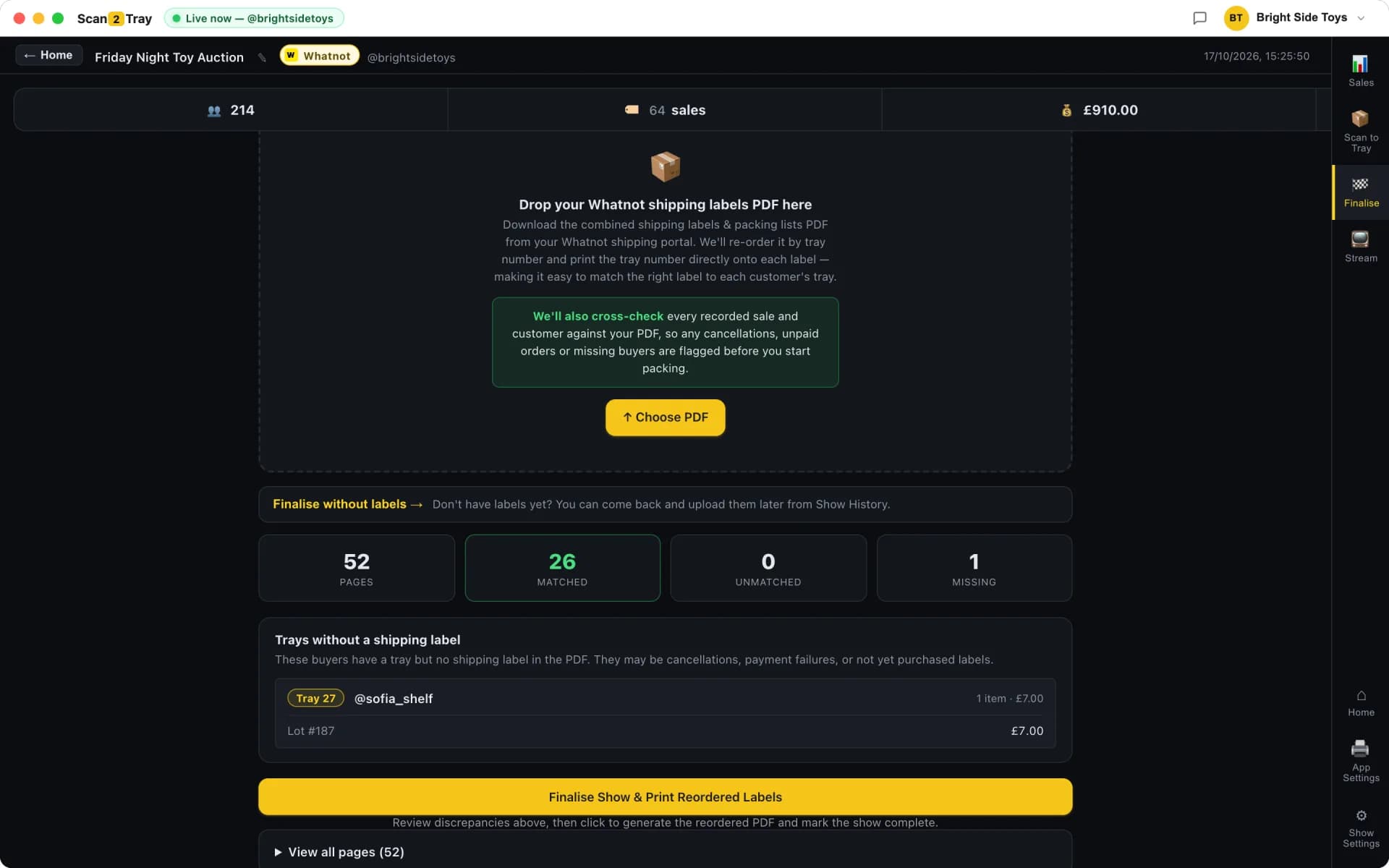
Scan2Tray solves this end-to-end. When you upload the Whatnot shipping labels PDF at the end of the show, it reorders the PDF to match your tray order. Print the whole stack, then walk through the trays one by one — top label goes on the top parcel in tray 1, next label goes on tray 2's parcel, and so on. Labels and parcels always line up. No sorting, no label-to-parcel hunting, no "wait, whose is this?"
The reorder-and-match workflow step by step
After the show, you've got a wall of trays each with a tray number on them. Upload Whatnot's shipping PDF. Scan2Tray reorders it so the first label in the stack matches tray 1, the second matches tray 2, etc. Print the stack. Walk the shelves. Done.
- Upload the Whatnot shipping PDF as-is — no manual prep needed
- Scan2Tray matches each shipping label to its tray by Whatnot order ID
- Mismatches and missing labels flagged before you print
- Print once, match once, done
When something doesn't line up
Sometimes the shipping PDF has orders in it that Scan2Tray didn't capture (e.g. an old order from a previous show, or a sale that hit the API after the show ended). Sometimes the reverse. Scan2Tray flags these mismatches before you print so you can resolve them manually. Better to catch a missing parcel now than when the buyer emails you a week later.
Power modes when you need them
Running 500+ sales with a team? Flip on the power modes. Scan every item as you pack for explicit verification. Use pre-printed stock barcodes for sub-5-second tray lookups during a hot run. Run multiple packers on different devices with the free mobile companion app. All the power-seller workflows are available, all optional, all off by default.
Most sellers never leave Simple Mode. That's intentional — we want Whatnot order management to feel like one workflow, not a toolbox you have to configure. The power modes are there if your scale demands them, not imposed on you to justify the pricing tier.
Whatnot order management: CSV spreadsheets vs Scan2Tray
Here's the shift from a typical Whatnot CSV-based workflow to Scan2Tray's live-capture desktop app.
| CSV + spreadsheet | Scan2Tray | |
|---|---|---|
| When orders are captured | After show (CSV export) | Live, second-by-second |
| Time to reconcile 500 orders | 30-60 minutes | 0 (already done) |
| Matching shipping labels to parcels | Manual, one by one | Auto-reordered PDF |
| Multi-buy customer handling | Manual grouping | Same tray, every time |
| "Has my order shipped" lookup | Open CSV, search, check pile | Type name, instant answer |
| Installation | Nothing (it's just Excel) | Download desktop app, 5 min |
| Monthly cost | Your time and sanity | Free |
Common questions
Is Scan2Tray a Whatnot order management system or just a packing tool?+
It's both — packing is one piece of order management, but the desktop app also captures, tracks, and reconciles every order from live sale to shipped parcel. You can think of it as Whatnot-specific order management software where the packing is automated.
How does Scan2Tray compare to using a general order management tool like ShipStation?+
General order management tools assume you've already got a fulfilment workflow — they help you print shipping labels and connect to carriers. Scan2Tray handles the piece before that: turning raw Whatnot sales into packed parcels ready for a shipping label. Many of our users use Scan2Tray for the pack workflow and their existing tools for shipping rates, which works fine.
Does it integrate with my existing Whatnot account?+
Yes — you log in once and Scan2Tray connects to your Whatnot shows from then on. No API keys, no developer setup, no additional Whatnot account configuration. It reads live sales data the same way the Whatnot app does.
Can I manage orders from multiple Whatnot accounts?+
Yes. You can connect multiple accounts to the same Scan2Tray install, which is useful if you run multiple brands, help another seller pack their show, or operate as a fulfilment service for other Whatnot sellers.
What happens to old orders I've already fulfilled?+
Scan2Tray starts tracking from the moment you connect it, not retroactively. Previously-shipped orders aren't imported (there's no benefit to doing so). New shows from connection day onwards are captured and tracked end to end.
Does Scan2Tray handle refunds or returns?+
Returns and refunds are handled inside Whatnot itself — that's their platform's domain. Scan2Tray tracks what shipped and what was in each parcel, which is useful when a buyer claims an item wasn't delivered (you can confirm it was packed and shipped), but the refund flow goes through Whatnot.
Related reading
Whatnot shipping tool
The shipping-label reorder workflow that saves 30 minutes per show.
Whatnot order tracking
How live capture and tray assignment give you end-to-end visibility on every order.
Whatnot bulk seller tools
Order management at 1,000+ orders per show — what scales and what breaks.
The hidden chaos after a Whatnot auction
Why post-auction processing takes longer than selling, and how to flip the ratio.
Start completely free.
Pack real shows end to end — scanning, trays, label printing, the lot — before you pay a penny. Every plan covers Whatnot, TikTok Shop and eBay Live in one subscription. Upgrade only when you outgrow the free allowance.
No card required to start
Run your first couple of shows free and see Scan2Tray work end to end.
Get started — free- Run your first shows on us — no card needed
- Whatnot, TikTok Shop & eBay Live included
- Full live sale capture & auto-assigned trays
- Barcode & shipping label printing
- macOS and Windows apps included
- Upgrade any time as you grow
For regular sellers running shows every week.
Choose Standard- Unlimited shows
- Up to 150 items per show
- Live sale capture & auto label printing
- Revenue tracking & reports
- Priority email support
For high-volume sellers and teams with no limits.
Choose Unlimited- Everything in Standard
- Unlimited items per show
- Unlimited scans
- Advanced modes for rapid sellers
- Export & advanced reports
Prices shown in your local currency. Cancel anytime — your data stays yours.