
1,000 orders a show, packed in an hour.
Big Whatnot shows used to mean all-night packing sessions and a sick feeling when you spot a mispack. Scan2Tray flips that — the bigger the show, the more time it saves you. Desktop app for Mac and Windows, built for real Whatnot sellers doing real volume.
Designed for volume from the ground up
Most packing tools quietly start breaking at 100 orders. The UI gets slow, the spreadsheet gets unwieldy, the sticky-note system collapses. Scan2Tray was designed to run a 1,000-sale show on day one, which means every decision was made with volume in mind — instant label printing, no end-of-show data entry, memory-less workflows that scale linearly.
Bulk Whatnot sellers regularly tell us the same thing: they used to dread the biggest shows because the packing afterwards would eat their entire next day. After switching to Scan2Tray, the biggest shows are the most profitable ones precisely because the packing scales down proportionally.
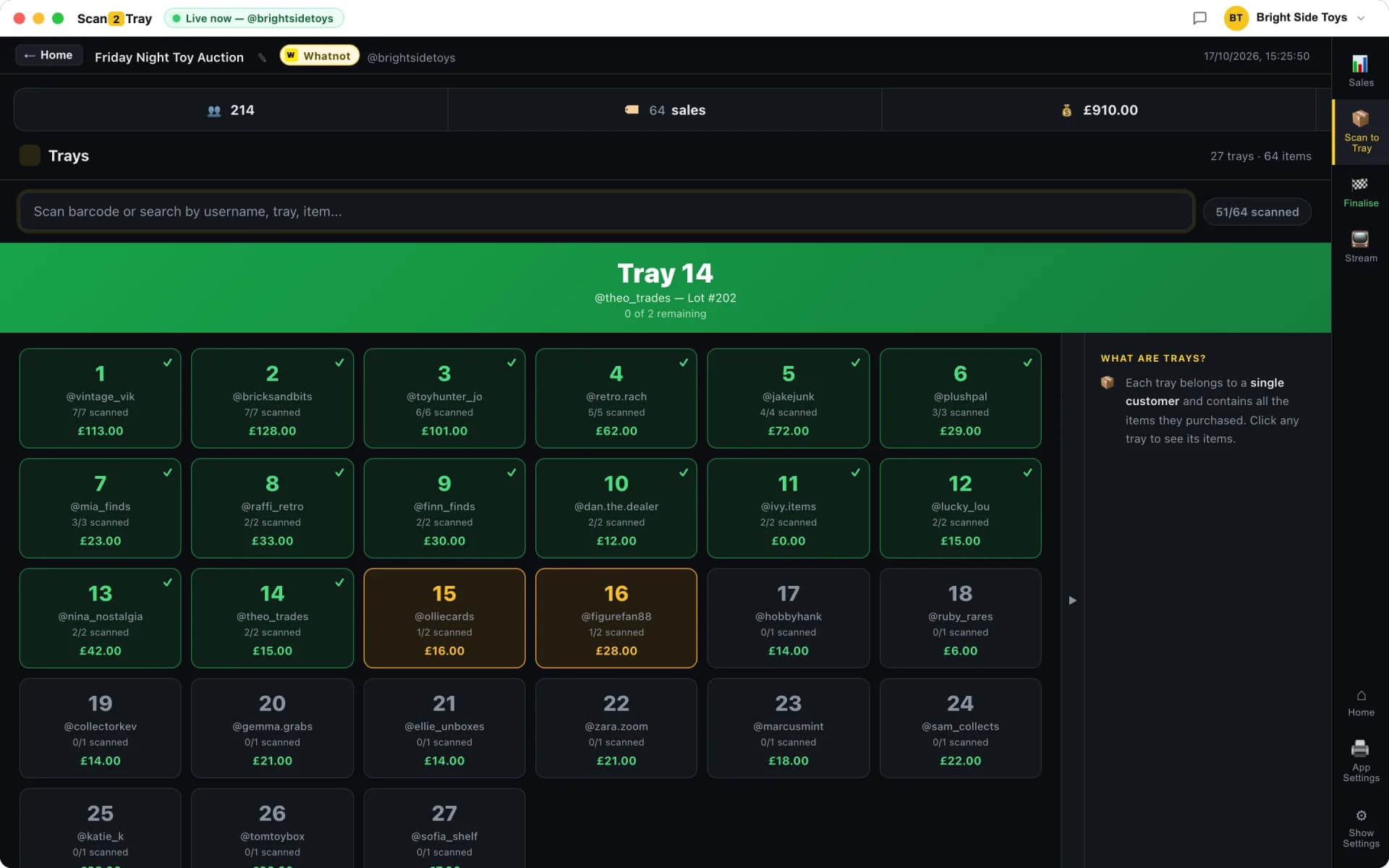
- Tray-assigned labels print the moment a sale hammers
- Item, buyer username and tray number on every label — no sorting needed
- Optional barcode scanning for rapid post-show verification
- PDF slip import for sellers who prefer bulk-packing after the stream
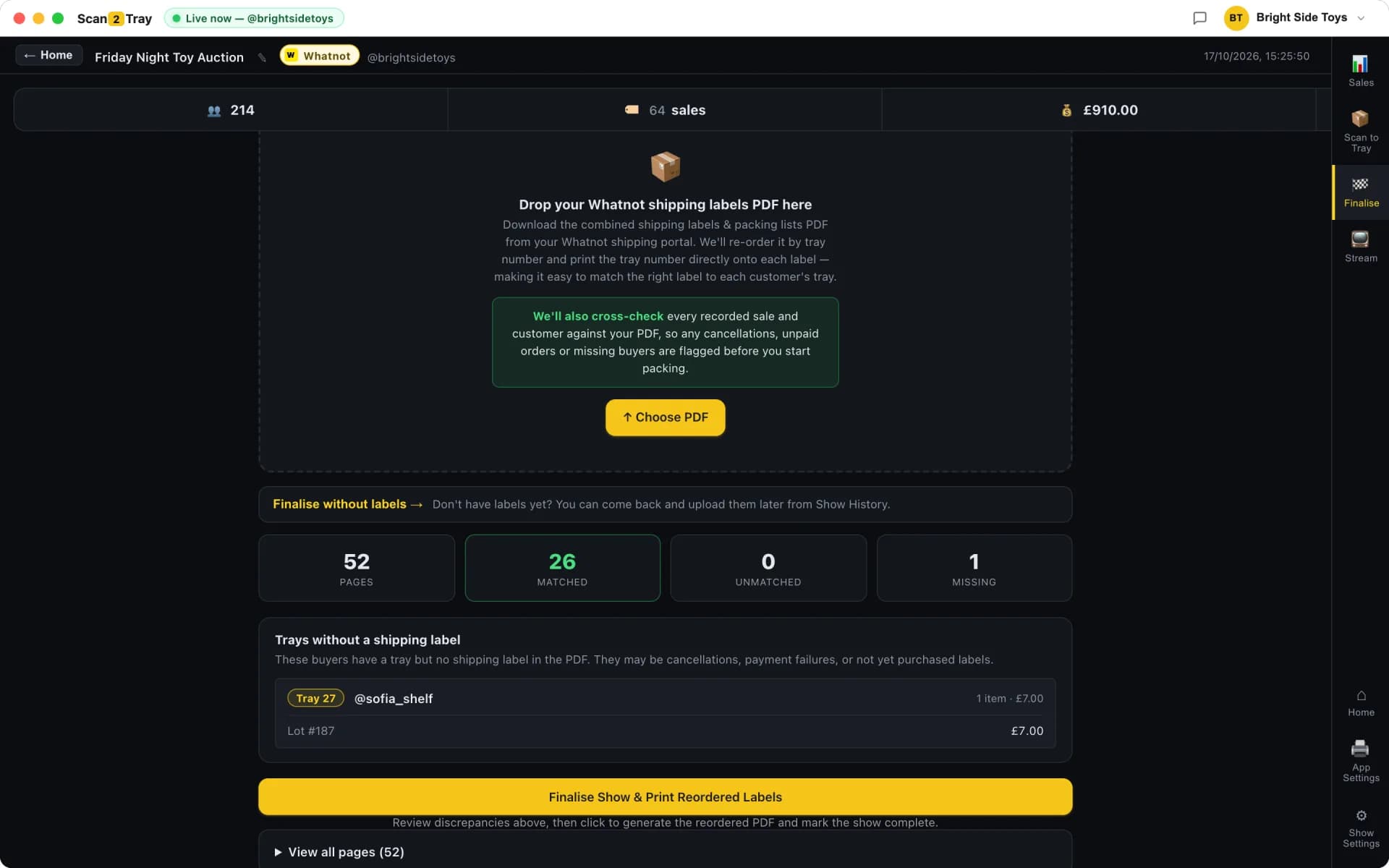
- Shipping labels automatically reordered to match tray order
- No cap on orders per show — 100, 500, 5,000, it's all the same workflow
Why bulk volume changes what you need from a tool
At 50 orders a show, almost any system works. At 500, small inefficiencies compound — a 30-second decision per item is 4 hours of labour. At 1,000+, the ability to run the same workflow regardless of volume becomes the difference between a profitable show and an unsustainable one. Scan2Tray was built on that observation.
What breaks at volume (and how we fixed it)
Traditional Whatnot packing workflows assume you can remember who bought what, hold a vague mental map of the pile, and process items in the order you picked them up. All three assumptions collapse past about 150 orders. Scan2Tray removes memory from the equation entirely — the label tells you the tray, the tray holds the items, the shipping label stack comes out in tray order. There's nothing to forget.
- No "what was that order ID again" mental overhead
- No handwriting buyer names on sticky notes
- No matching shipping labels to parcels one at a time
- No end-of-show reconciliation ritual
One person can run a 1,000-sale show
Sellers using Scan2Tray regularly pack shows that used to need a team of four — solo, in an evening, while watching TV. That's not hyperbole; we hear it enough that it's no longer surprising. The reason it's possible is that most of the work in a traditional packing workflow is cognitive, not physical. Lookups, decisions, double-checks. Automate the cognitive work and one pair of hands can move through items at physical-speed.
For the small fraction of sellers who genuinely need a team — variety shows with very different item sizes, fulfilment centres, shared operations — Scan2Tray's team mode lets every packer work from their own device in sync. No stepping on each other's trays, no handoff chaos.
Simple by default, rapid when you need it
Start in Simple Mode. A label prints when each item sells. You stick it on, drop it in the numbered tray. No scanner, no app on your phone, no spreadsheet. For most bulk Whatnot sellers, that's the entire tool they need for the rest of their career.
When you're hitting sub-5-second sales during a rapid run — the kind where your hammer is down before the previous item is off the table — flip on the power modes. Pre-print barcodes on your stock before the show, then scan during or after to instantly see which tray each item belongs in. The free iPhone/Android companion app means multiple packers can work in parallel off their own phones.
Power modes for scaling past 1,000 orders
The top 1% of Whatnot sellers regularly do shows with 2,000+ items sold. Scan2Tray keeps up — there's no hard ceiling on orders, no performance cliff, no rate limiting. Here's what those sellers typically turn on:
- Pre-printed stock barcodes: scan any item to learn its tray instantly
- Mobile companion app: 2-4 packers scanning in parallel off their phones
- Barcode-verified packing: scan item, scan tray, system confirms the match
- Batch mode: pile labels as sales happen, tray the stack after the show
Bulk Whatnot packing: Scan2Tray vs the old way
Here's what changes when you switch from manual bulk packing to Scan2Tray's desktop app. Numbers taken from sellers we've worked with directly.
| Manual bulk packing | Scan2Tray | |
|---|---|---|
| Time to pack a 500-sale show | 4-6 hours | ~30 minutes |
| Time to pack a 1,000-sale show | 8-12 hours | ~60 minutes |
| People needed | 2-4 | 1 (or team mode) |
| Lookups per item | 1-2 (who was this?) | Zero |
| Typical mispack rate | 0.5-1% | Effectively 0% |
| Recovery from mistakes | Refund + reship + review damage | Caught before it ships |
| End-of-show reconciliation | 30-60 minutes | None needed |
Common questions
How many Whatnot orders can Scan2Tray handle in one show?+
There's no cap. Sellers regularly run 1,000+ sales through a single show, and some do 2,000-3,000. The software was built to handle volume linearly — the workflow is the same whether you sell 50 items or 5,000, it just takes proportionally longer at the physical packing step.
Do I need a team to handle a high-volume Whatnot show?+
Most sellers doing 500-1,000 sales a show pack solo with Scan2Tray. Above that, team mode genuinely helps — multiple packers work from the free mobile companion app on their own devices, each scanning items into the correct tray without stepping on each other. One person can still handle volume a team of four used to need.
What's the difference between Simple Mode and the power modes for bulk Whatnot sellers?+
Simple Mode is label-first: each sale prints a tray-assigned label, you stick it on and drop it in the tray. Power modes add barcode scanning — either scanning items during the show for rapid sale-to-tray lookup, or scanning after the show for batch packing. Most bulk sellers use a hybrid: Simple Mode during normal-paced segments of the show, power modes during rapid runs.
Can I pre-print barcodes on my stock?+
Yes. Scan2Tray can generate printable barcodes for your stock in bulk, which you print and stick on items before the show. During or after the show, scanning any barcoded item tells you instantly which tray it belongs to. This is the fastest post-show packing workflow we've found for bulk sellers.
Does Scan2Tray support multiple Whatnot shows per day?+
Yes. You can run back-to-back shows with no downtime between — Scan2Tray tracks each show separately, so your trays and labels from the morning's stream don't collide with the evening's. Useful for sellers running multiple brands or guest-hosting other sellers' shows.
How much does it cost for bulk Whatnot sellers?+
Start free with no card and no per-seat pricing. For bulk sellers, the Unlimited plan (£39.99/month) removes all limits — unlimited shows, items and scans. Standard (£15/month) covers regular sellers, and you can cancel anytime.
Related reading
Whatnot seller tools overview
The full picture of what Scan2Tray does — and why it's focused on the one workflow that matters.
Whatnot order management
The sale-to-shipped pipeline that makes bulk volume feel routine.
Whatnot shipping tool
Why shipping labels reordered to match your trays cuts pack time in half.
How to process 200 Whatnot orders in under an hour
The mindset and workflow changes that turn volume from a curse into a superpower.
Start completely free.
Pack real shows end to end — scanning, trays, label printing, the lot — before you pay a penny. Every plan covers Whatnot, TikTok Shop and eBay Live in one subscription. Upgrade only when you outgrow the free allowance.
No card required to start
Run your first couple of shows free and see Scan2Tray work end to end.
Get started — free- Run your first shows on us — no card needed
- Whatnot, TikTok Shop & eBay Live included
- Full live sale capture & auto-assigned trays
- Barcode & shipping label printing
- macOS and Windows apps included
- Upgrade any time as you grow
For regular sellers running shows every week.
Choose Standard- Unlimited shows
- Up to 150 items per show
- Live sale capture & auto label printing
- Revenue tracking & reports
- Priority email support
For high-volume sellers and teams with no limits.
Choose Unlimited- Everything in Standard
- Unlimited items per show
- Unlimited scans
- Advanced modes for rapid sellers
- Export & advanced reports
Prices shown in your local currency. Cancel anytime — your data stays yours.