
Live sales.
Packed right.
Every time.
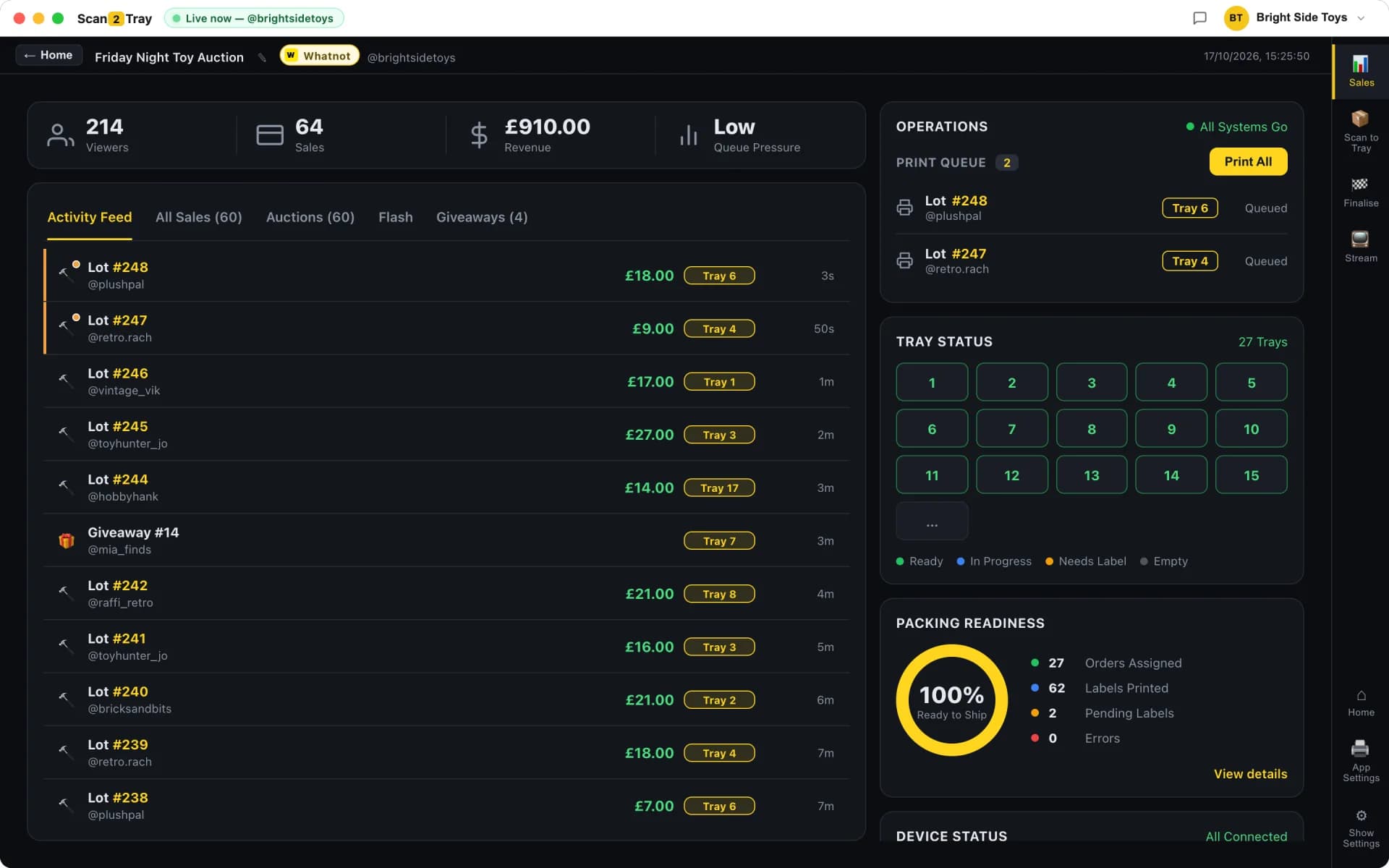
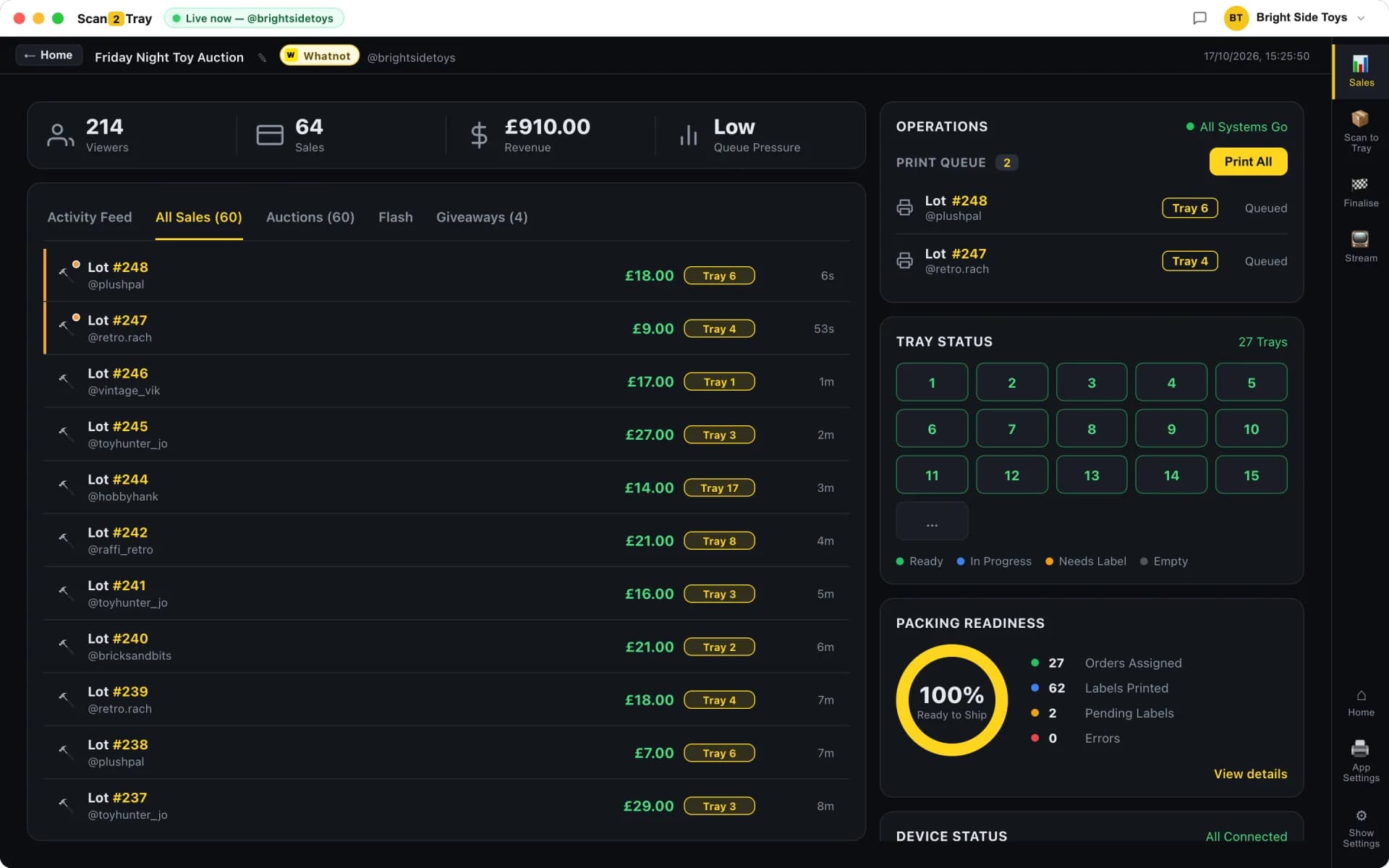
Item sold → tray number prints instantly. Stick the label on, drop it in the tray. That's the whole workflow. Our desktop app watches your Whatnot or eBay Live stream in real time; on TikTok Shop you pre-print barcode stickers and import TikTok's shipping PDF after the live. All in the same subscription. No CSVs, no end-of-show scramble.
Item: Hoodie
Three steps. That's the whole workflow.
Simple Mode is what most sellers pick. It's dead simple. Power sellers can switch up a gear when they're ready — more on that below.
Go live — Scan2Tray listens
Connect your Whatnot or eBay Live show once. Scan2Tray listens in real time — no CSV uploads, no manual entry, no end-of-show scramble. Selling on TikTok Shop? Pre-print barcode stickers, stick one on each item as it sells, and import TikTok's shipping PDF after the live.
Item sold → label prints instantly
The hammer drops and a label prints — item, buyer, tray number. Stick it on and drop it in the tray, or pile the stack on the side and sort it all after the show.
Print shipping labels — ship
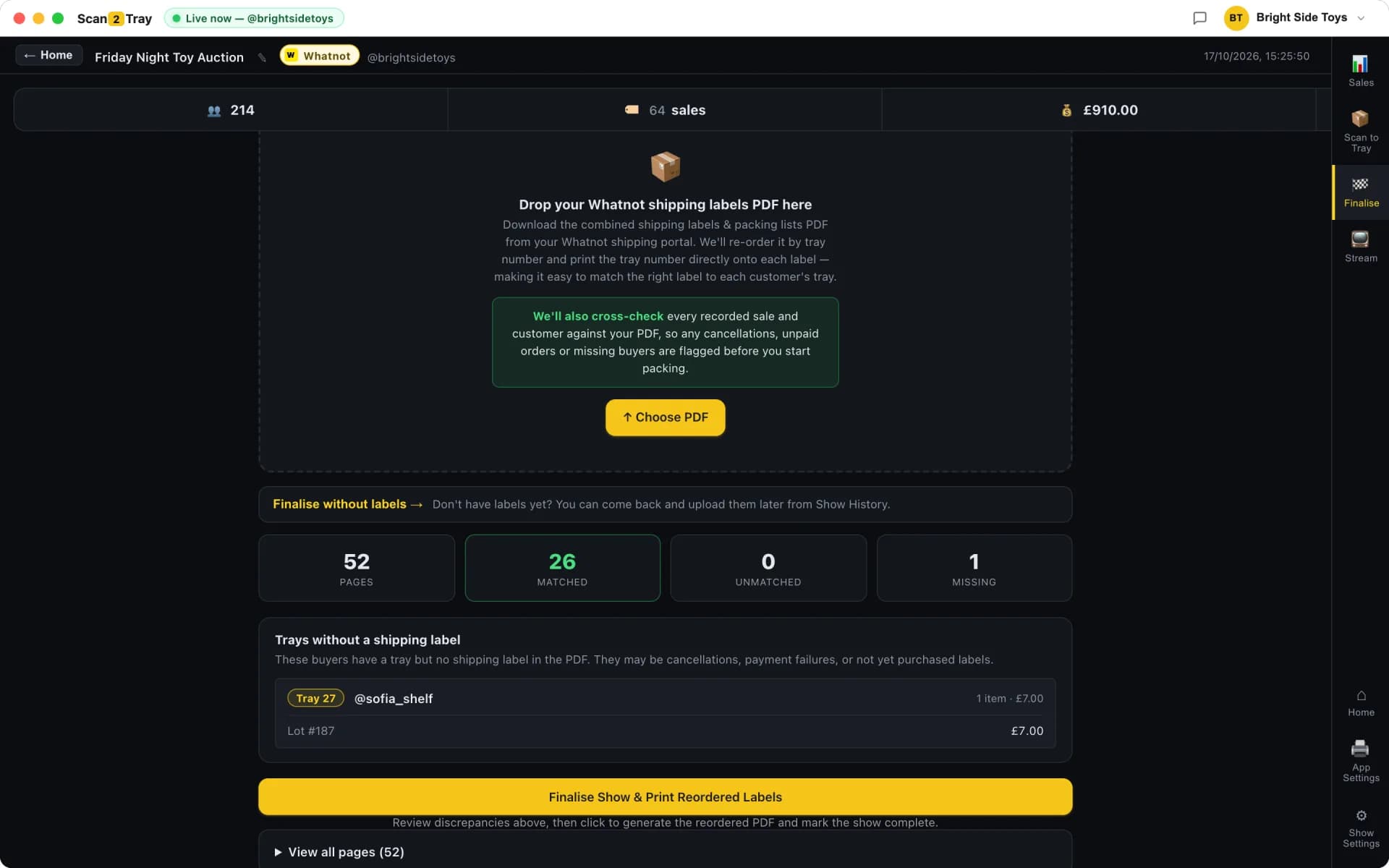
Once your trays are full, print your shipping labels from Scan2Tray. We overlay the tray number on every label, so matching each parcel to its tray is instant. Pack, seal, ship. Done.
Your phone is your scanner.
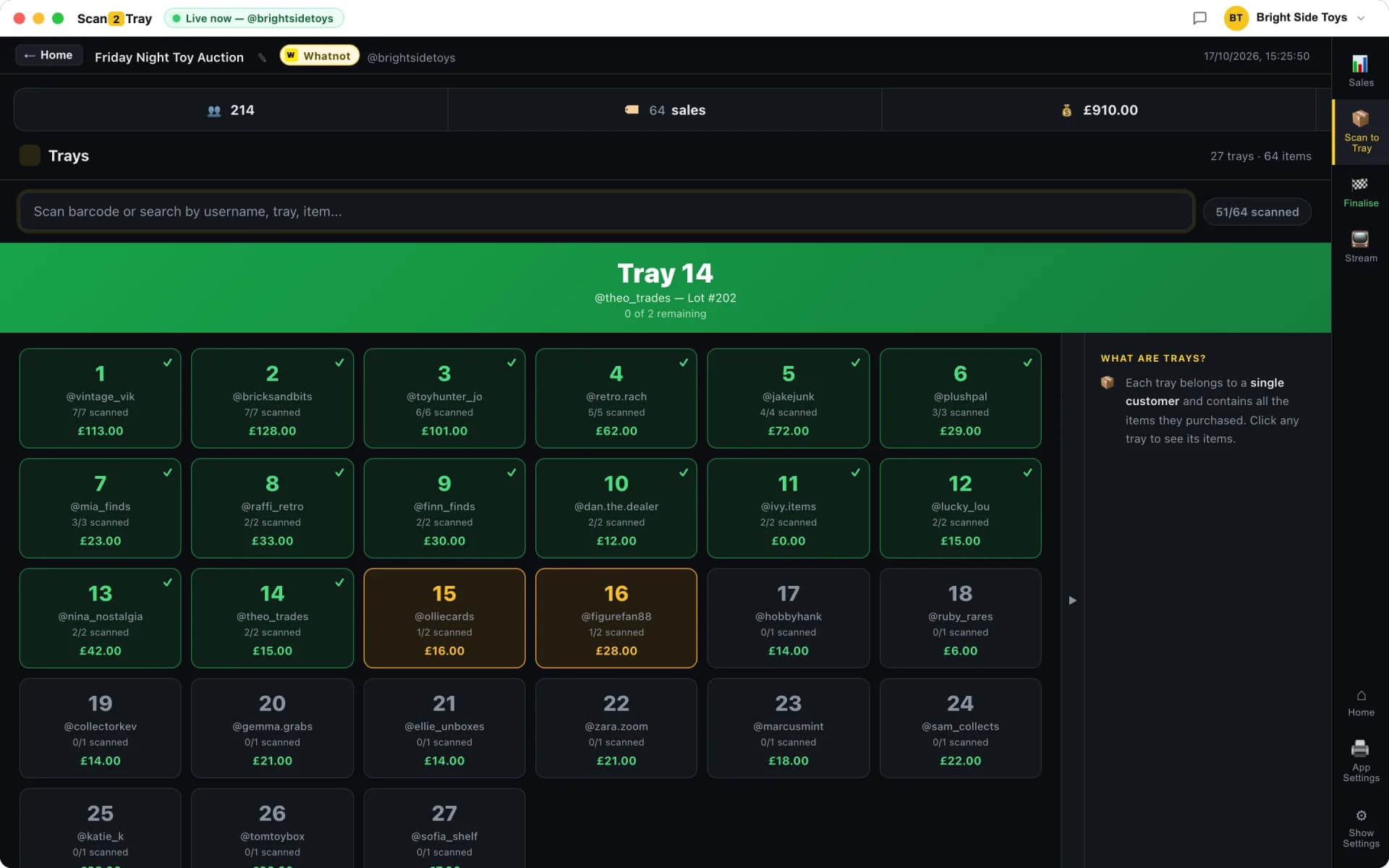
The free Scan2Tray companion app turns any phone into a barcode scanner. Scan items into trays during the show and into boxes when packing — no hardware scanner needed.
- Camera scanning with instant audio and haptic feedback
- Scan to Tray during the show, Scan to Box when packing — the same modes as desktop
- Your whole team packs in parallel on their own phones, synced in real time
- Works offline and syncs automatically when you're back online
Get the app
Free with every plan, including Free. Sign in by scanning a QR code from your dashboard — no password typing on your phone.
Requires a Scan2Tray account.
1,000s of sales a week. Packed by one person. Zero mistakes.
Every buyer is automatically assigned a tray the moment they win. Their name, the item and the tray number print straight onto the label — so every parcel lands in the right place without you thinking about it.
Rapid modes for serious sellers.
Simple Mode handles the 99%. For the tiny fraction of shows where you're hitting sub-5-second sales or running a team, Scan2Tray has gears you can shift up into. No extra setup — flip them on when you're ready.
Pre-printed Barcodes + iPhone Scanner
Print barcodes for your stock before the show. After the show, scan any item with our free iPhone companion app — it instantly tells you the buyer's tray number. Lets you hit sub-5-second sales during the stream.
Team Mode
Assign trays across your team. Everyone scans from their own device. Nobody steps on anyone else's toes.
Pile & Batch Mode
Don't break your selling rhythm to walk items to trays. Stick the label, pile it up, keep selling — then tray the whole stack after the show in one rapid pass.
Which mode works where
Two ways to run a show. Pick the one that fits how fast you sell — then check which app and platform supports it below.
Print as you sell
Most sellersGo live and sell. Scan2Tray watches the stream, assigns each buyer a tray and prints a barcode label the moment an item sells. No setup before the show.
Pre-show labels
Sub-5-second salesPre-print numbered barcode stickers before the show. Stick the next one on each item as it sells, then import the platform's shipping PDF when the show ends and every sticker is matched to its buyer.
| Whatnot | eBay Live | TikTok Shop | |
|---|---|---|---|
| Desktop appWindows & Mac | |||
Print as you sell Live capture, labels print as you sell | Live capture | BetaLive capture | Coming soonNo live capture yet |
Pre-show labels Pre-printed stickers + shipping PDF import | No PDF export from eBay | ||
| Web appAny browser, nothing to install | |||
Print as you sell Needs the desktop app to watch the stream | Desktop app | Desktop app | |
Pre-show labels Print sticker sheets, import the PDF after | |||
| Mobile scanner appiPhone & Android, free | |||
Scan items to trays & boxes Works with every show from the desktop or web app | |||
One subscription covers every app and platform. eBay Live capture is in beta; TikTok Shop doesn't expose live sales to third-party apps yet, so TikTok shows use pre-show labels mode.
“Scan2Tray changed our workflow completely. We ship 3x more and never make a mistake.”
A small thermal label printer — that's it.
Scan2Tray prints a label for every sale, so you'll need a label printer that takes 50mm × 25mm labels on a roll. Any compatible thermal printer works — no ink, no toner, no fuss.
- Compatible with most USB thermal label printers on Amazon
- 50mm × 25mm labels on a roll (widely available, cheap to restock)
- No ink, no toner — thermal printers just need paper
Already have a thermal label printer? You're good to go — just load up 50mm × 25mm labels.
Everything you need — £129.99
Don't have a printer? Grab our starter bundle once you're signed in:
- • Thermal label printer
- • Label roll holder
- • 1 roll of 50mm × 25mm labels
The starter bundle is available to purchase from your account once you've signed in.
Start completely free.
Pack real shows end to end — scanning, trays, label printing, the lot — before you pay a penny. Every plan covers Whatnot, TikTok Shop and eBay Live in one subscription. Upgrade only when you outgrow the free allowance.
No card required to start
Run your first couple of shows free and see Scan2Tray work end to end.
Get started — free- Run your first shows on us — no card needed
- Whatnot, TikTok Shop & eBay Live included
- Full live sale capture & auto-assigned trays
- Barcode & shipping label printing
- macOS and Windows apps included
- Upgrade any time as you grow
For regular sellers running shows every week.
Choose Standard- Unlimited shows
- Up to 150 items per show
- Live sale capture & auto label printing
- Revenue tracking & reports
- Priority email support
For high-volume sellers and teams with no limits.
Choose Unlimited- Everything in Standard
- Unlimited items per show
- Unlimited scans
- Advanced modes for rapid sellers
- Export & advanced reports
Prices shown in your local currency. Cancel anytime — your data stays yours.
Earn with Scan2Tray
Refer Whatnot & TikTok sellers and earn recurring commission on every subscription. Join our affiliate program — it takes a minute.
Become an affiliateDownload Scan2Tray.
Free to download — start packing real shows free, no card needed. Works offline, syncs when you're back online.
macOS 12+ (Apple Silicon & Intel) · Windows 10/11 (64-bit)
Questions, answered.
Which platforms does Scan2Tray work with?+
Whatnot, TikTok Shop and eBay Live — all in the same subscription, at no extra cost. Whatnot and eBay Live get print-as-you-sell live capture. TikTok Shop doesn't expose live sales yet, so it runs in pre-show labels mode only: pre-print barcode stickers, stick one on each item as it sells, then import TikTok's shipping PDF after the live. Whichever you sell on, the packing end is the same tray workflow, and there's nothing separate to buy per platform.
What hardware do I need?+
A thermal label printer that takes 50mm × 25mm labels on a roll — that's it. Most compatible USB thermal printers on Amazon work fine. If you don't have one, we sell a starter bundle for £129.99 (printer + label roll holder + 1 roll of labels) which you can order from your account once you're signed in.
Do I need a barcode scanner?+
No. In default mode, no scanner or app is needed at all — the tray number prints right on the label, so you just read it and drop the item in. Scanners and our free iPhone companion app are only used for advanced rapid-selling modes.
How many sales can it handle?+
There's no cap. Sellers regularly pack 1,000+ orders a show. The more you scan, the faster it gets.
How do I know every item ended up in the right tray?+
Every buyer is auto-assigned a tray when they win. Their label prints with their name, the item and the tray number — so the sorting is already done before you pick the item up. Power sellers can also switch on optional barcode-verified packing for belt-and-braces checking.
How much does it cost?+
Start completely free — run your first shows end to end with no card. When you outgrow the free allowance, plans start at £15/month (Standard) with Unlimited at £39.99/month. Every plan covers Whatnot, TikTok Shop and eBay Live — one subscription, all platforms. Cancel anytime.
Stop wasting your nights packing.
No card needed to start. Pack your next show in a fraction of the time.
Get started — free